01
“I have to leave for work before you open. I wish you opened earlier.”
That order never gets dropped off.
The missed hours
SafeSpin24 WDF-Access gives laundromat operators a controlled, supported way to extend wash-dry-fold customer access beyond traditional counter hours — without replacing the WDF software, workflow, or people you already have.
Your WDF software runs the order.
SafeSpin24 makes more customer-access hours usable.
No commitment · 15-minute call · WDF-Access is optional

What it is
The physical-world, after-hours handoff layer between the customer, the laundromat, and the WDF system you choose — secure access, a designated handoff experience, customer support, and a connected web-based operating view.
The short version
Everything below is the detail behind those four lines — how the handoff works, what gets documented, and how to run the numbers for your own store.
What your customers say
You've heard both of these across the counter. Each one is a customer who wanted the service and couldn't use it.
This isn't a staffing problem. It's an access problem — and access is a systems problem.
The experience
Customers use secure access, QR codes, SMS, and browser-based interactions. Eight pieces make up the program.
Dedicated WDF handoff camera
Every deployment includes a standalone camera focused on the WDF drop-off and pickup area, separate from general store security coverage. It documents designated handoff activity, supports customer service when an issue is reported, and gives you a clearer event history around after-hours interaction.
The camera isn't there to watch customers. It's there to document the handoff and support the customer if something goes wrong.
Retention and access
Handoff footage is retained 30 days to support dispute resolution, then automatically deleted. It's accessible only to you and your manager, to FreeByrd during an active case, and to SafeSpin24 support resolving a specific customer issue. Never used for marketing, never shared with third parties, never kept past the resolution window unless there's an active dispute or legal hold. Customers are notified of coverage by posted signage at the handoff zone.
Knowledgeable, personable assistance for customers who need help with access, drop-off, pickup, or routine questions. When verification and your rules allow, FreeByrd resolves it. When an issue needs operator judgment, a physical review, or a customer remedy, FreeByrd escalates it to the owner or manager on duty with the available context.
The goal isn't to make customers wait for a callback. It's to acknowledge, assist, and route.
A missing bag shouldn't be your 11pm phone call
FreeByrd is the first responder. It verifies the customer and reference, checks ready status and pickup window, reviews access events, pulls camera-event references, and communicates calmly — opening an escalation only when the situation needs human judgment or physical verification.
2 min
To acknowledge every WDF case
15 min
To resolve what FreeByrd can resolve
Full packet
On every escalation, not a bare alert
Where the line sits
| FreeByrd resolves | FreeByrd escalates to you |
|---|---|
| Early arrival, or an order not yet marked ready | Order marked ready but can't be located |
| Wrong pickup-area direction | WDF status conflicts with the handoff history |
| Authorized credential or door issue | Customer disputes a recorded pickup |
| Pickup-verification guidance | Another customer may have taken the order |
| Resending an authorized reference or instructions | Camera evidence is unavailable or inconclusive |
| Routine questions and clearly documented issues | Refund, liability, insurance, replacement or remedy decisions |
| Anything with a documented answer | Theft, tampering, forced entry, safety or criminal conduct |
What the customer hears
“I'm sorry you can't find your order. I'm checking your pickup record, entry activity, and handoff timeline now. I'll keep you updated.”
Records, without accusation
“I can see an account pickup event at 7:43 PM. That does not determine what happened to the bag, so I'm opening a priority review for the store team.”
What it looks like in your store
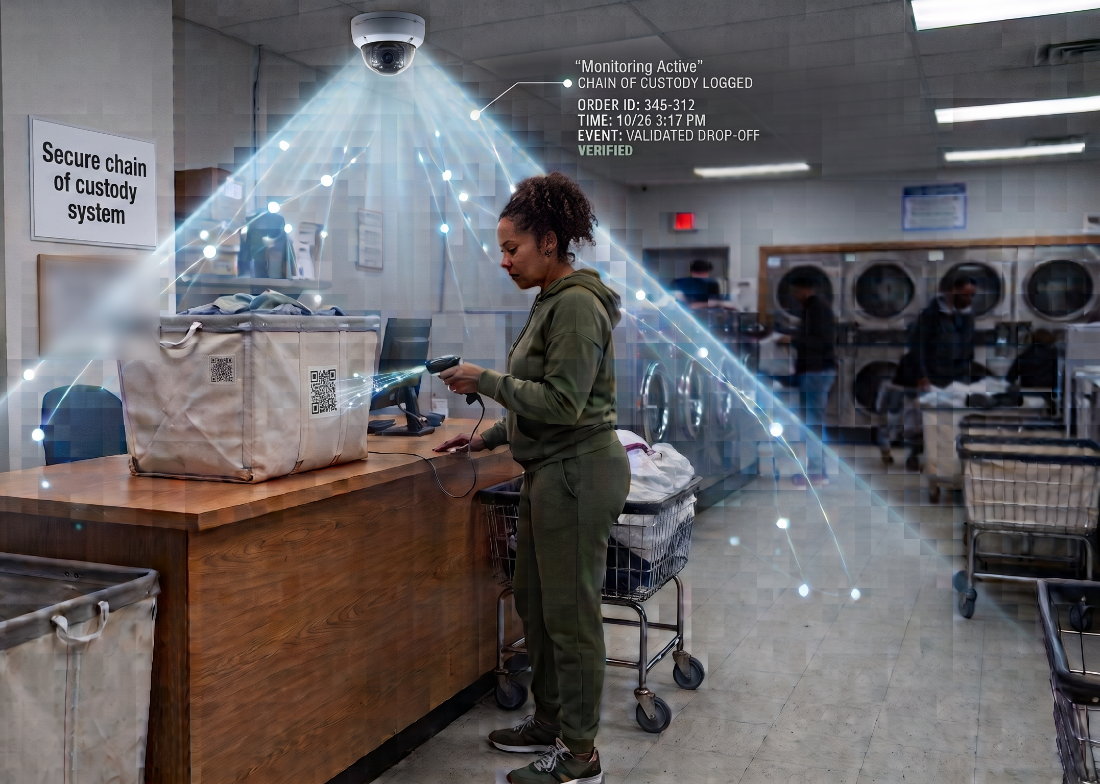
Nothing moves. The drop-off counter, the scale, the cart, the shelves and the bagged-order area stay where they are. WDF-Access adds two things to that room — a credentialed way in, and a camera that sees the counter.
AI-generated illustration · not a photo of a real store
A general store camera may show activity in the room. A dedicated WDF-Access camera documents the actual customer handoff.
2 AI-generated illustration, not a photograph of a real store. The on-screen order reference and timestamp are sample data. Counter position, door type and camera placement are set during the site walk — the install adapts to your build-out, whether that's a hollow metal door into a built-out office or an aluminum storefront entry.
Proof of custody
SafeSpin24 doesn't claim no bag will ever be lost, damaged, mixed up, or stolen. It builds a documented proof-of-custody record around every handoff: who entered, when, what reference they used, whether the zone event was recorded, when your team accepted custody, when the order was staged, and who completed pickup.
Every stage of the handoff
| Stage | What SafeSpin24 records | What you own |
|---|---|---|
| Customer entry | Credential or account, location, timestamp, access authorization | Define who's eligible and when the window is open |
| Drop-off check-in | Customer, bag or order reference and timestamp | Set the service rules and the official order policy |
| WDF-zone event | Dedicated camera-event reference | Maintain the zone layout and the storage area |
| Operator acceptance | Time and identity of the team member accepting custody | Inspect, weigh, price, confirm, process |
| Order ready | Ready and pickup-eligibility event, where available | Fulfill, quality-check, package, stage safely |
| Customer pickup | Access, pickup confirmation, timestamp, camera-event reference | Authorize release and manage exceptions |
| Dispute | Case ID, timeline, camera references, support notes | Investigate, decide the remedy, communicate the outcome |
Store entry and order release are two separate permissions. You define pickup eligibility, third-party policy, required verification, and how exceptions get handled.
The dashboard
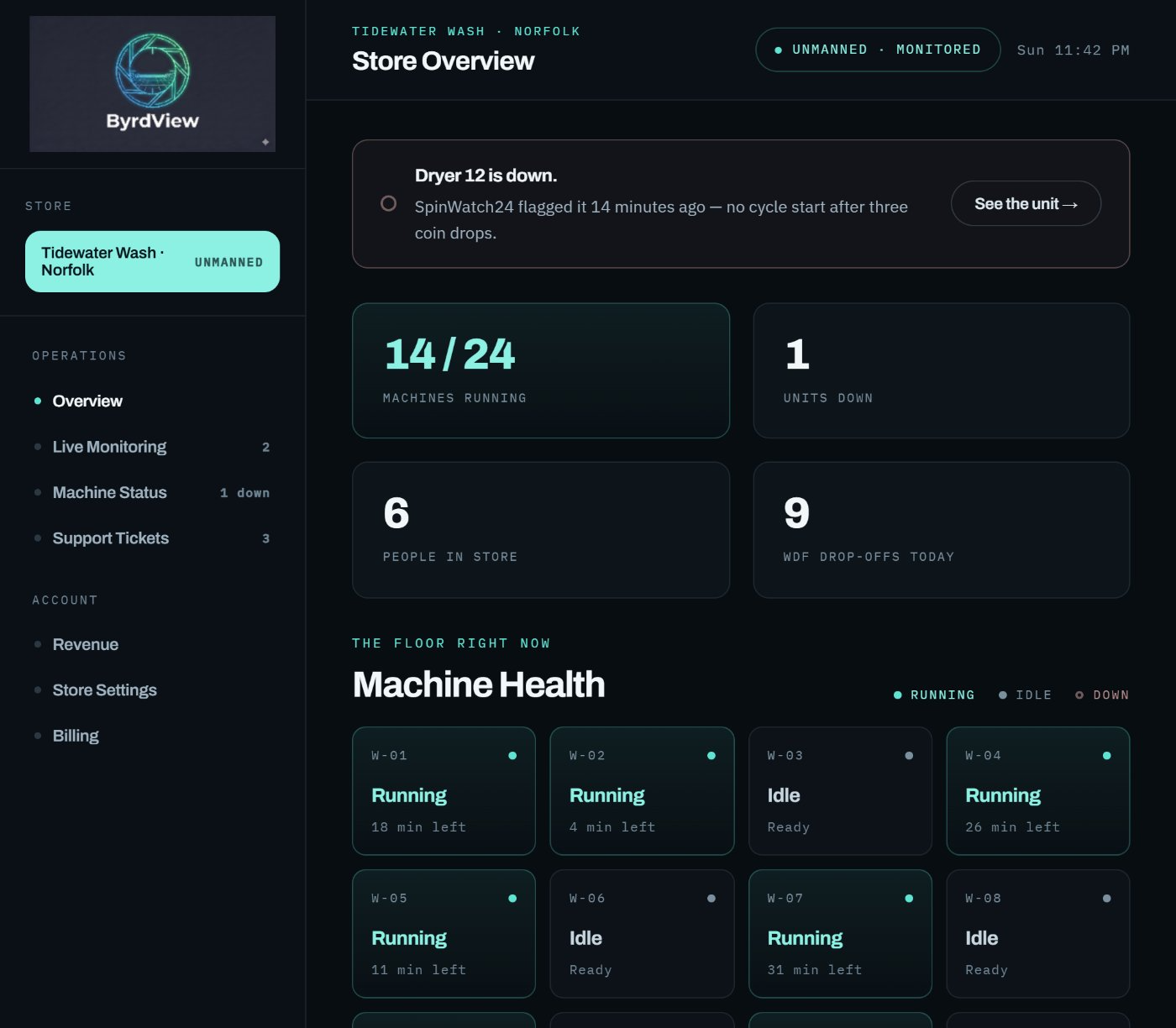
ByrdView is where the store reports to you. Machine state, who is on the floor, what SpinWatch24 flagged, what FreeByrd handled on its own, and every after-hours drop-off that booked while the counter was dark.
Product preview · sample store data
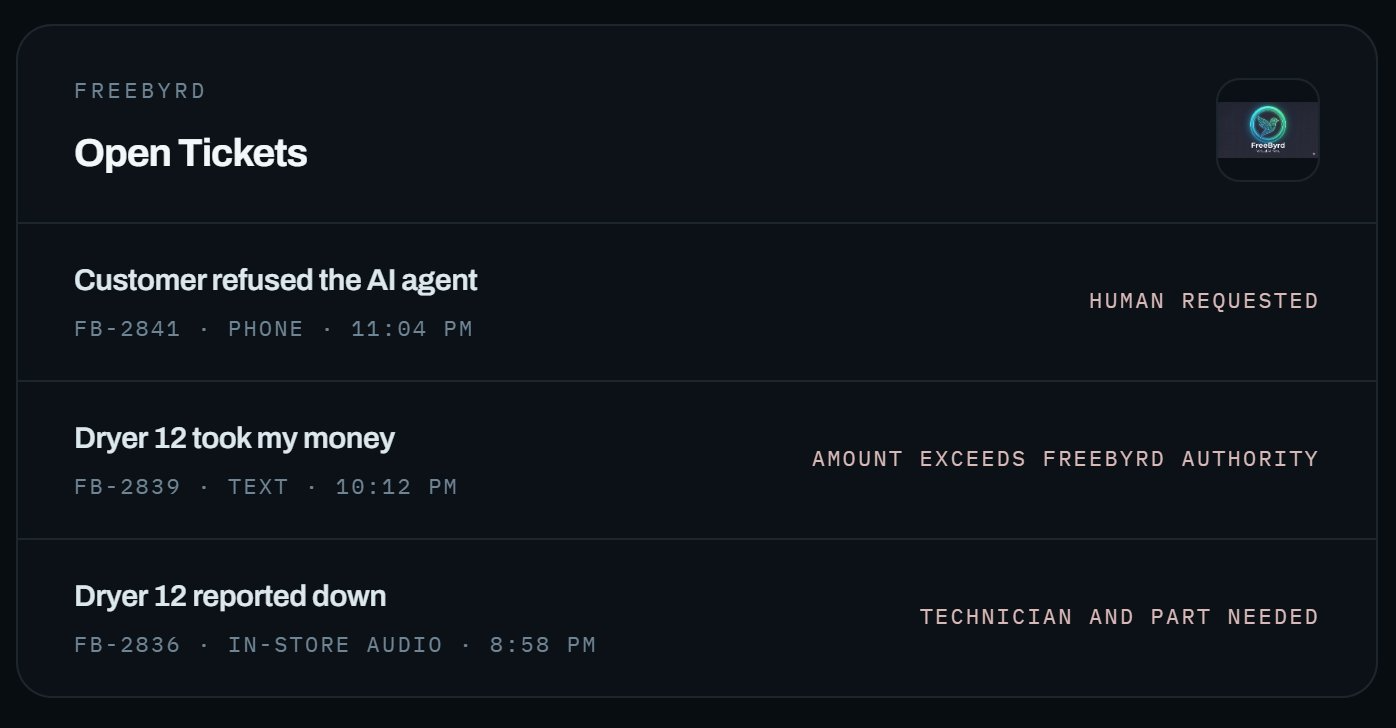
FreeByrd escalation
Tickets arrive with the reason a human is needed.
FreeByrd answers the phone, the text, and the in-store audio call. What it can settle, it settles. What it can't — a refund above its authority, a customer who wants a person, a machine that needs a part — arrives as a ticket that already says why.
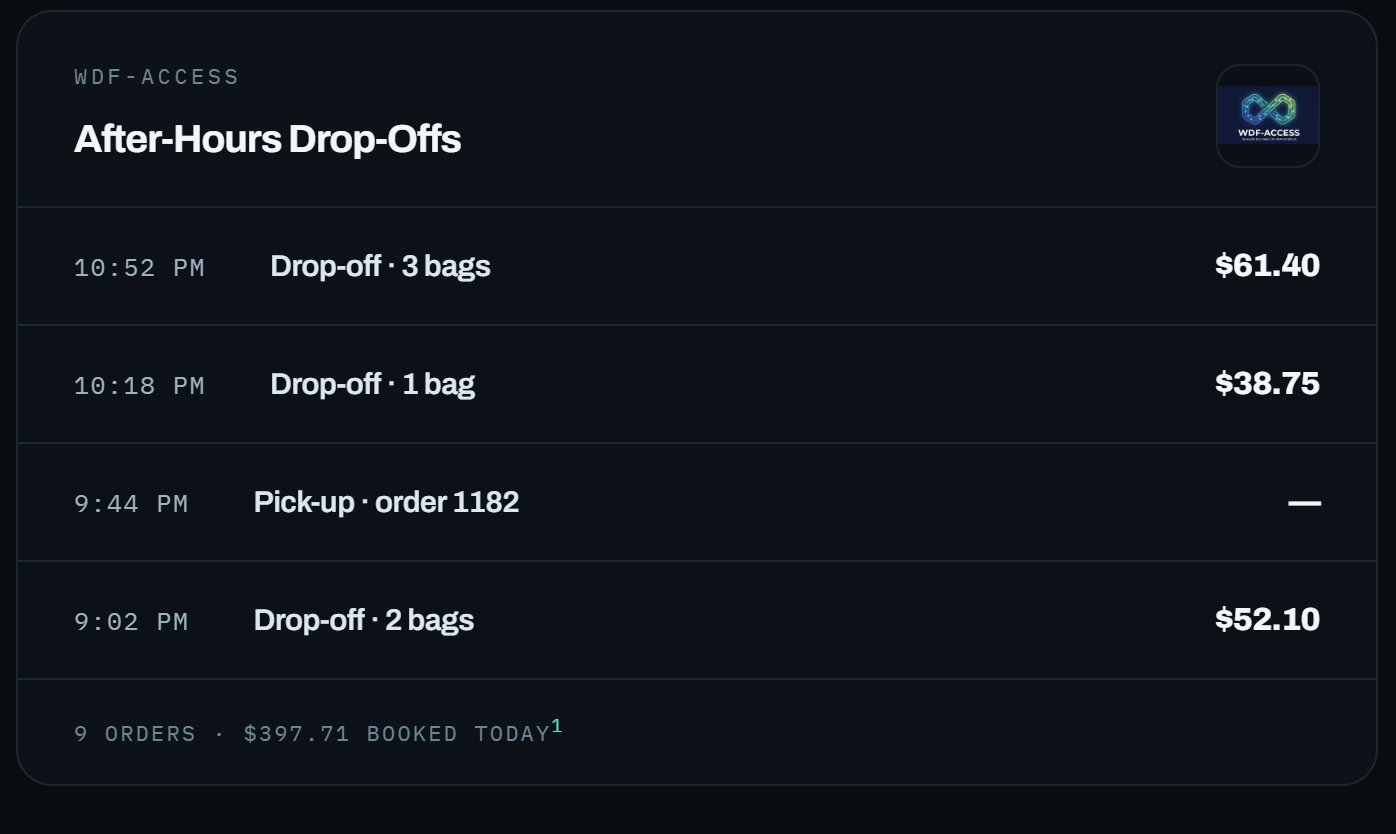
After-hours revenue
Orders that booked with nobody at the counter.
Every drop-off is timestamped against the entry that authorized it, and every pickup against the release. This is the log you check in the morning to see what the closed hours earned.
1 Interface preview for design review, not a live store. Machine counts, ticket text and drop-off times are sample data. Order totals are shown at the $44.19 benchmark average drop-off WDF order value.
The revenue opportunity
You know roughly how many customers a week ask you to open earlier or stay open later. Start there, decide how many of them would actually use after-hours access, and the math follows. The 2025 benchmark average for a drop-off WDF order is $44.19.
Start from
Customers a week who ask you to open earlier or stay open later
How many of them would actually use it
Stores
Added WDF orders a day, per store
Stores
$31.56
Daily revenue
$960
Monthly revenue
$11,521
Annual revenue opportunity
10 asks a week · 50% convert · 0.7 added orders per day per store · 1 store · $44.19 average order · 365 operating days · before costs
Against what it costs
$750
SafeSpin24 subscription, monthly
0.6
Added orders a day, per store, to cover it
+$210
Monthly revenue above the subscription
At 0.7 added orders a day, the subscription is covered by roughly 0.6 of them. The rest is revenue you weren't capturing before — still before your own labor, supplies, and processing costs.
Multi-store annual revenue opportunity · Swipe horizontally on smaller screens →
| Added orders / day / store | 1 store | 2 stores | 3 stores | 4 stores | 5 stores |
|---|---|---|---|---|---|
| 1 | $16,129 | $32,259 | $48,388 | $64,517 | $80,647 |
| 2 | $32,259 | $64,517 | $96,776 | $129,035 | $161,294 |
| 3 | $48,388 | $96,776 | $145,164 | $193,552 | $241,940 |
| 4 | $64,517 | $129,035 | $193,552 | $258,070 | $322,587 |
| 5 | $80,647 | $161,294 | $241,940 | $322,587 | $403,234 |
1 Illustrative revenue scenario based on a $44.19 average drop-off WDF order value and 365 operating days. Revenue is before fulfillment labor, supplies, utilities, payment processing, taxes, rework, refunds, and other costs. Results are not guaranteed and depend on each operator's market, pricing, customer demand, capacity, service quality, and business decisions.
How much WDF demand is currently unavailable because potential customers can't use the service on their schedule?
For existing WDF operators
Already use a WDF POS, order-management system, pickup-and-delivery platform, or established workflow? WDF-Access is designed to fit around it — not replace it. Two jobs, cleanly divided.
You choose the model that fits your store. WDF-Access supports a gradual transition rather than a forced all-or-nothing change.
Five ways operators start
| Operating approach | How WDF-Access can fit |
|---|---|
| Existing staffed WDF counter | Extend customer access beyond counter hours while preserving your current production workflow |
| After-hours drop-off | Offer customers a controlled way to initiate WDF handoff outside counter hours |
| Controlled after-hours pickup | Add pickup access as your process and readiness allow |
| Hybrid staffed / unmanned | Retain staff where they create value while expanding customer access when the counter is closed |
| Multi-location operations | Create a more consistent customer-access framework across locations |
Who controls what
SafeSpin24 provides the access, support, and documentation layer. You run the laundry.
Common questions
WDF software · POS · payments · card · kiosk · mobile
Your WDF platform and your payment provider stay the systems of record. SafeSpin24 adds the physical-access and customer-recovery layer around them — credentialed entry, owner-defined access windows, monitoring, and first-response support.
Accounts, orders, payments, production and reporting stay in your platform. We never sit between you and your operator's customers.
Credentialed entry, the designated handoff zone, dedicated handoff documentation, and live customer support — the layer software alone can't cover.
WDF-Access works standalone today. As partnerships develop, we can connect the access experience more closely to your system.
Get started
If WDF fits your store, WDF-Access gives you a controlled way to test and expand customer access without committing first to another counter shift or a major software replacement.
Add a secure after-hours customer-access layer around the WDF workflow you already run.
Explore whether controlled after-hours customer access can help you test WDF demand before making a larger operational commitment.
Use SafeSpin24 for secure access, customer support, and security-focused monitoring — with WDF-Access available if and when it fits.
Pick a time that works. We'll walk your store's hours, your WDF setup, and whether after-hours access is worth testing there.
Fifteen minutes is enough to tell whether WDF-Access fits your store. If it doesn't, we'll say so.
No commitment · 15-minute call · WDF-Access is optional